
frontline.io for Mobile and Tablet
Field guidance, Remote Assist and Digital Twin access on iOS and Android devices.
Use frontline.io on the smartphones and tablets your teams already carry. Run Interactive Flows, join Remote Assist sessions, access Digital Twins and identify parts without dedicated XR hardware.

Why Mobile and Tablet with frontline.io?
Mobile and tablet access gives field teams a practical way to use frontline.io without waiting for headset deployment.
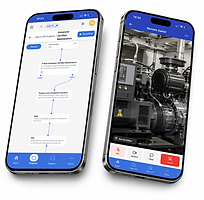
Support work at the point of need
.png)
Use Interactive Flows, Digital Twins and Parts Catalog experiences directly where the work happens.
Connect experts without travel
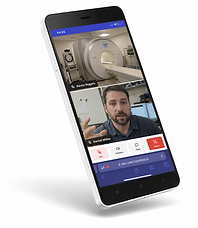
Remote Assist lets technicians share what they see and receive real-time guidance from experts.
Start with devices teams already use
Give technicians access to frontline.io from iOS and Android devices already in the field.

Extend access to more users
Mobile access helps support technicians, operators, partners and occasional users from devices they already use.
What frontline.io delivers on Mobile and Tablet
frontline.io brings guided work, expert support and equipment knowledge to the mobile devices your teams already use.

Digital Twins
Access equipment-specific Digital Twins to understand machine structure, components and procedures in context.
Interactive Flows & Procedures
Guide technicians step by step through work instructions, maintenance tasks and troubleshooting procedures.
Remote Assist
Connect field teams with remote experts through live video, guidance and collaboration tools.
Parts Catalog
Identify the right component visually and connect parts to the relevant procedure.
Object Tracking
Support AR-assisted guidance and object tracking workflows where enabled for the deployment.
Tasks
Assign, receive and complete tasks connected to published procedures, helping teams stay organized and accountable
Mobile browser access
Allow external users or occasional participants to join supported Remote Assist workflows through a shared browser link.
Comparing frontline.io hardware paths
For teams planning their industrial AR strategy, the question is not only which headset to use. It is how to protect existing content, support today’s teams and plan the next deployment path.
Access highlight | Details |
|---|---|
Platforms | iOS and Android |
Device type | Smartphone and tablet |
Core use cases | Interactive Flows, Remote Assist, Digital Twins and Parts Catalog |
Hardware requirement | No dedicated XR headset required |
Field access | Designed for technicians, operators and support teams in the field |
Guest access | Browser-based access for supported Remote Assist workflows |
Where Mobile and Tablet fit
Mobile and tablet access is best for field teams that need guidance, support and equipment knowledge on the devices they already carry.
Mobile and Tablet
Best for field access, Remote Assist, Interactive Flows, Parts Catalog and on-the-job guidance.
PC, Mac and Web
Best for content creation, review, management and broader access without XR hardware.
Meta Quest 3
Best for immersive training, simulation and Digital Twin walkthroughs.
HMS SiNGRAY G2
Best for new industrial AR deployments on physical equipment
HoloLens 2
Best for existing HoloLens 2 deployments that need continuity.
Frequently asked questions
Put frontline.io in every technician’s pocket
Use frontline.io on iOS and Android devices to guide work, connect experts and give teams access to the equipment knowledge they need in the field.