

Keep expert knowledge in the flow
Your most experienced engineers know how to solve problems that are not written down anywhere. frontline.io keeps that knowledge connected to the work, with one AI-powered XR platform for training, support, and operations.
-
Always current
-
Accessible on any device
-
Ready when the next technician needs it
The frontline.io AI-powered XR platform
A single platform to unite your entire machinery lifecycle. Align training, support, and operations to accelerate workforce ramp-up and maximize machine uptime.
Technicians get clearer guidance
Managers see where work happens and where it can improve
Trainers scale hands-on immersive training without classrooms or travel
Experts support more teams remotely
01
Digital Twin
Mirror your real-world operations in a live digital replica. Convert CAD files into detailed, interactive 3D models of your physical equipment in under 4 minutes with Fast Track Pro. The Digital Twin is the core of the platform. It powers Interactive Flows, the Immersive Room, Parts Catalog, and Remote Assist sessions from a single model. Compatible with AR, VR, and Mixed Reality.
Use it to: Train teams on complex machinery, guide technicians through live procedures, and give remote experts full 3D context.
02
Automated Content Creation
Convert CAD files into an interactive Digital Twin in under 4 minutes with Fast Track Pro, or transform any PDF or Word document into a guided Interactive Flow with Doc to Flow. Build content once, deliver it across AR, VR, desktop, tablet, and mobile without rewriting anything.
Use it to: Eliminate manual content creation bottlenecks, migrate legacy documentation, and scale your knowledge library without a development team.
03
Remote Assist
Connect frontline workers with remote experts in real time, share live video, annotate, and resolve issues without being on site. Built for field service teams that cannot afford downtime. Improves first-time fix rates and retains expert knowledge from every resolved session.
Use it to: Support technicians anywhere, speed up troubleshooting, and reduce field service costs without sacrificing resolution quality.
04
Immersive Training
Train your workforce in immersive XR environments inside the Immersive Room, reducing onboarding time and improving knowledge retention at scale. Instructors and trainees gather around a Digital Twin for hands-on learning, simulation, and assessment. Eliminates physical classrooms and travel costs. Runs on any device in screen, AR, MR, or VR mode.
Use it to: Prepare teams before they reach the field, run procedure simulations, and deliver hands-on training with Digital Twins and guided experiences.
05
Interactive Flows
Create step-by-step Interactive Flows directly on your Digital Twin, covering assembly, maintenance, and troubleshooting. Deliver them to technicians on any device, in 2D, AR, or VR, without writing a single line of code.
Use it to: Standardize execution, reduce errors, and make expert guidance available at the exact moment and place work happens
06
Parts Catalog
Access your full parts library instantly. Search, identify, and order components directly from the field without leaving your workflow. An interactive 3D parts catalog with advanced search and filter capabilities, built directly from your Digital Twin.
Use it to: Find the right part faster, reduce confusion on complex assemblies, and support more accurate service and maintenance
07
Analytics
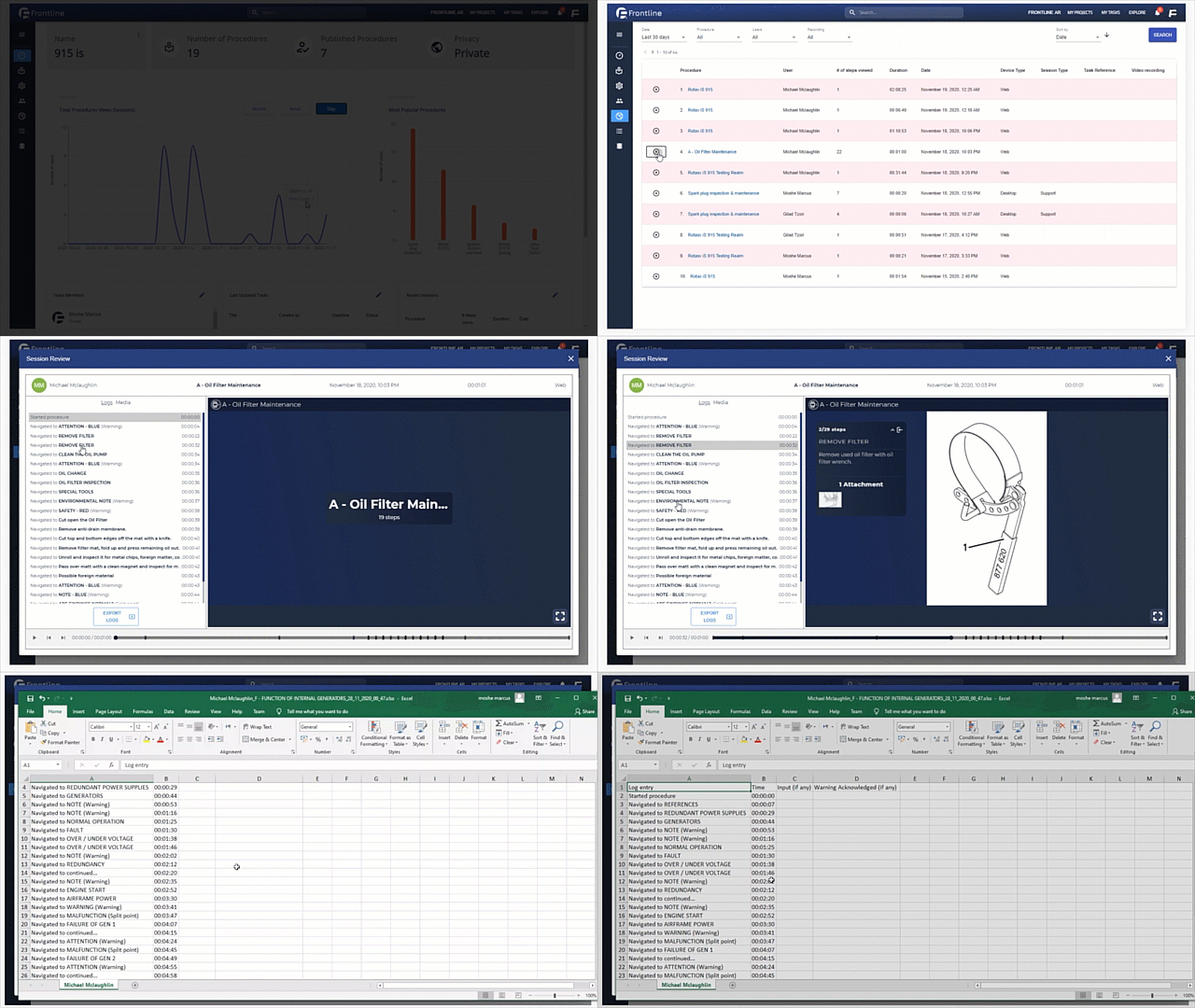
Capture every workflow and use AI-driven insights to optimize performance. Real-time monitoring and recording of Interactive Flows and Remote Assist sessions, enabling immediate response and continuous improvement. Track usage, completion, training progress, and support activity across teams and sites. Compatible with leading AI and BI systems.
Use it to: Measure performance, identify knowledge gaps, improve content, and demonstrate XR ROI to leadership.
08
MS 365 Guides Migration Tool
Microsoft has discontinued HoloLens and phased out Dynamics 365 Guides but your training and operational knowledge doesn’t have to disappear. Upload your existing Guides directly into frontline.io. They are automatically converted into Interactive Flows, with animations, interactions, and 3D tools fully intact. No rebuilding. No coding required.
Use it to: Protect years of XR investment, migrate to a device-agnostic platform, and keep content deployable across AR, VR, MR, desktop, tablet, and mobile.
Turn knowledge into execution at scale
From creation to execution to insight, all in one platform
01
Author
Turn knowledge into guided workflows. Convert PDFs, manuals, and expert knowledge into step-by-step Interactive Flows and Digital Twins with AI.
02
Train
Prepare teams before they reach the field. Deliver hands-on Immersive Training with Digital Twins and guided experiences.
03
Operate
Execute work the right way. Guide tasks step by step and standardize execution across teams and sites.
04
Assist
Get the right answers in real time. Surface the right knowledge with AI and connect teams with experts through Remote Assist.
05
Analyze
Improve with every action. Capture workflows and use AI-driven insights from Analytics to optimize performance.
AI for the workflow lifecycle
Remote Assist connects to frontline.io’s AI Suite. Experts and technicians get the right knowledge, the right procedure, and the right guidance at the moment they need it.
Knowledge Hub
A centralized, searchable repository of all your Digital Twins, Interactive Flows, procedures, and parts data — accessible to every team, on any device.
Translate with AI
Instantly translate Interactive Flows and training content into multiple languages — so global teams always work in their native language without duplicating content creation.
AI Insight
Surface the right knowledge at the right moment. AI-driven recommendations guide technicians and experts to the most relevant procedures, parts, and support history.
Doc to Flow
Turn existing documentation into structured Interactive Flows automatically. Upload SOPs, manuals, or technical guides as PDF, Word, or plain text. AI reads the content and builds a complete flow in minutes. Your team reviews and refines instead of rebuilding from scratch.
Ready to future-proof your service operations?
Join the global leaders using frontline.io to replace static manuals with interactive Digital Twins — and unite training, support, and operations on one AI-powered XR platform.